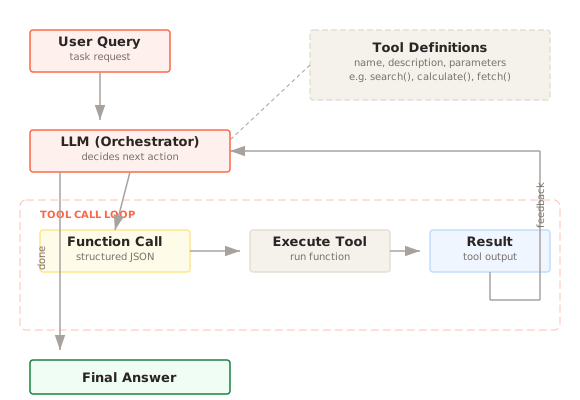
Tool Calling is a pattern that lets an LLM invoke external functions, APIs, or services during generation. The model outputs a structured function call with arguments, the system executes it, and the result is fed back to the model for the next reasoning step.
What problem does Tool Calling solve?
A language model, on its own, is a closed system. It can generate text based on its training data and whatever context you provide in the prompt, but it cannot reach outside that boundary. It cannot call an API to check the weather. It cannot query a database to look up a customer record. It cannot perform precise arithmetic beyond what it can simulate through token prediction. It cannot send an email, create a calendar event, or trigger a deployment.
This limitation makes raw LLMs unsuitable for most practical applications where the user expects the system to actually do something, not just talk about doing something. The gap between "I can tell you how to check your account balance" and "I checked your account balance and it is $1,247.30" is the gap between a chatbot and a useful agent. Tool calling bridges that gap.
How does Tool Calling work?
The pattern works through a structured loop between your application code and the language model. You define a set of tools, each described by a name, a natural language description of what it does, and a schema for its input parameters. You include these tool definitions in the system prompt or API configuration when calling the model.
When the model decides it needs to use a tool, it does not generate a natural language response. Instead, it emits a structured object, typically JSON, specifying which tool to call and what arguments to pass. Your application code intercepts this, validates the arguments, executes the actual function (makes the API call, runs the database query, performs the calculation), and returns the result to the model. The model then uses that result to formulate its response to the user.
This loop can repeat multiple times within a single conversation turn. The model might call a search tool, examine the results, decide it needs more specific information, call a different tool with refined parameters, and then synthesize a final answer from all the gathered data. Each iteration follows the same pattern: model emits a tool call, your code executes it, the result goes back to the model.
The critical architectural point is that the model never executes anything itself. It only produces a description of what it wants to happen. Your code is the execution layer, which means you retain full control over what actually runs. You can validate inputs, enforce rate limits, check permissions, and log every action before it happens. The model proposes; your code disposes.
When should you use Tool Calling?
Tool calling is the right pattern whenever the model needs information or capabilities that are not in its training data or the current prompt context. The most common cases are real-time data access (current stock prices, live system status, weather), operations on external systems (sending messages, updating records, triggering workflows), and precise computation (math, date calculations, data transformations where token prediction is unreliable).
It is also the right choice when you want to keep the model's responsibilities narrow. Rather than trying to stuff every possible piece of context into the prompt, you let the model decide what information it needs and fetch it on demand. This keeps prompts small, reduces token costs, and means the model works with current data rather than a potentially stale context snapshot.
If you are building anything that goes beyond question-answering over static text, you will likely need tool calling. It is the foundation of agent-style systems where the model acts as a reasoning and planning layer while external tools handle execution.
Implementation
What are the common pitfalls?
Schema design is where most tool-calling implementations fail first. If the tool description is vague or the parameter names are ambiguous, the model will misinterpret when to use the tool or what arguments to pass. A tool called "search" with a parameter called "query" gives the model very little to work with. A tool called "search_customer_orders" with parameters "customer_id" (required, string) and "date_range" (optional, object with start and end) communicates intent much more clearly. Investing time in precise, well-documented tool schemas pays off immediately in reliability.
The model calling the wrong tool is a real problem in systems with many tools. If you expose 30 tools, the model may confuse similar-sounding options or try to use a tool for a purpose it was not designed for. Keeping the tool set small and focused for each conversation context helps. You do not need to expose every tool in every interaction.
Infinite loops happen when the model calls a tool, receives a result it does not understand or cannot use, and calls the same tool again with slightly different parameters, over and over. Setting a maximum tool call count per turn and implementing circuit breakers are basic safeguards.
Security is the most serious concern. The model is generating inputs that your code will execute. If one of your tools writes to a database or calls a third-party API with side effects, a malicious or confused model could cause real damage. Every tool call should be validated against an allowlist of permitted operations, parameter values should be sanitized, and destructive operations should require explicit confirmation before execution.
What are the trade-offs?
Each tool call adds latency. The model must generate the structured output, your code must execute the function, and the result must be sent back. For simple tools like a calculator, this overhead is small. For tools that call external APIs with their own latency (database queries, third-party services), each tool call can add hundreds of milliseconds or more. Multi-step tool chains where the model calls three or four tools in sequence can push total response time well beyond what feels interactive.
Schema maintenance is an ongoing burden. Every time you change an API, add a parameter, or rename a field, the tool schema must be updated. If the schema drifts from the actual implementation, the model will generate calls that fail at execution time. Treating tool schemas as a contract with the same discipline you apply to API versioning helps, but it is additional work that teams often underestimate.
The security surface area is real and proportional to the power of your tools. A read-only search tool is low risk. A tool that can modify production data is high risk. You need to think carefully about the blast radius of every tool you expose and implement appropriate guardrails. This is not optional and it is not paranoid. Models will occasionally generate unexpected tool calls, and your execution layer must handle those safely.
Goes Well With
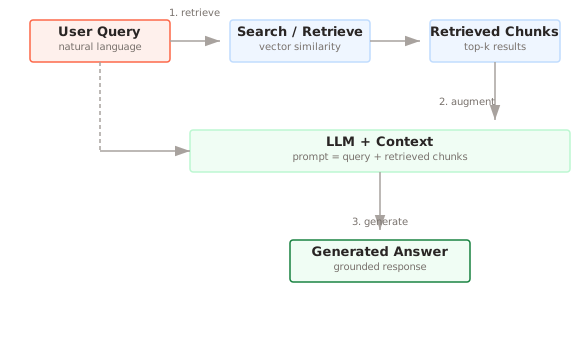
Basic RAG can be reimplemented as a tool. Instead of hardcoding the retrieval step into your pipeline, you define a "search_documents" tool and let the model decide when to retrieve information and what queries to run. This gives the model more flexibility, as it can rephrase queries, search multiple times, or decide that retrieval is not needed for a particular question.
Code Execution pairs naturally with tool calling for tasks that require complex computation. Rather than trying to define a tool for every possible calculation, you expose a code execution sandbox as a single tool. The model writes and runs code to solve math problems, transform data, or generate visualizations. This is significantly more flexible than a fixed set of function tools, though it comes with its own security considerations around sandboxing.
References
- Schick, T., et al. (2023). Toolformer: Language Models Can Teach Themselves to Use Tools. NeurIPS 2023.
- Patil, S., et al. (2023). Gorilla: Large Language Model Connected with Massive APIs. arXiv preprint.
Further Reading
- Schick et al., "Toolformer: Language Models Can Teach Themselves to Use Tools" (2023) — Demonstrates that language models can learn to decide when and how to call external tools (calculators, search engines, translators) by training on self-generated tool-use examples. arXiv:2302.04761