Code Execution is a pattern that lets an LLM write and run code in a sandboxed environment during inference. Instead of reasoning about computations in natural language, the model generates executable code, runs it, and incorporates the output into its response.
What problem does Code Execution solve?
Language models are remarkably good at producing text. They can summarize, translate, and reason through problems with impressive fluency. But there is a wide category of tasks where text alone is not enough. Ask an LLM to compute compound interest over 30 years with monthly contributions and you will get an answer that looks plausible but may be subtly wrong. Ask it to generate a bar chart and it will describe one in words rather than produce an actual image.
The gap shows up everywhere. Data analysis requires running real computations against real datasets. Visualization demands executable rendering code, not a verbal description of what a chart should look like. SQL queries need to hit an actual database to return results. Mathematical proofs benefit from symbolic computation that verifies each step. The LLM understands what needs to happen but lacks the ability to make it happen directly.
This is not a limitation you can prompt your way around. No amount of chain-of-thought reasoning will make an LLM reliably multiply large matrices or render a Matplotlib figure. You need actual code running on actual hardware.
How does Code Execution work?
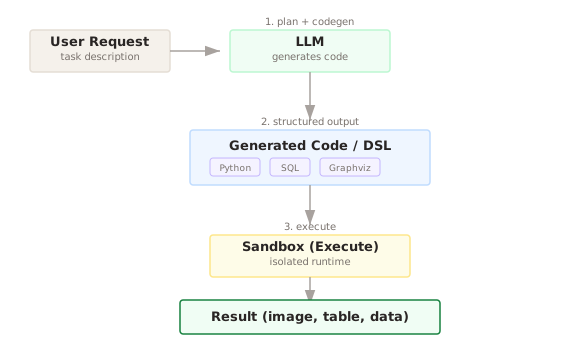
The Code Execution pattern splits the work into two distinct phases. First, the LLM generates code that solves the problem. Second, a sandboxed runtime executes that code and returns the results. The LLM acts as the programmer. The sandbox acts as the computer.
Think of it as giving the model a scratch pad that actually runs. When a user asks "show me a scatter plot of revenue vs. headcount for these 50 companies," the LLM writes a Python script using Matplotlib or Plotly, the sandbox executes it, and the rendered image comes back to the user. The model never tries to draw the chart itself. It writes the instructions and lets a real interpreter do the work.
The sandbox is critical. You are executing LLM-generated code, which means you are executing code you did not write and did not review. The sandbox constrains what that code can do. No filesystem access beyond a temporary working directory. No network calls unless explicitly allowed. Resource limits on CPU time and memory. This is not optional. Running untrusted code without isolation is a security incident waiting to happen.
This pattern works with many target languages. Python is the most common because of its ecosystem for data science and visualization. SQL is another natural fit, where the LLM writes a query and the sandbox executes it against a database connection. Graphviz DOT notation lets the model describe graph structures that get rendered into diagrams. The key insight is that the LLM does not need to understand rendering pipelines or database internals. It just needs to produce syntactically correct code in the target language.
When should you use Code Execution?
Use Code Execution when the task involves computation, data transformation, or artifact generation that an LLM cannot reliably do through text generation alone.
Specific signals that this pattern fits well:
- The user needs a chart, graph, or visualization as output
- The task involves numerical computation where precision matters (financial calculations, statistics, simulations)
- You need to query structured data in a database
- The output is a file (PDF report, CSV export, image) rather than plain text
- The problem involves iterative data manipulation, things like filtering, grouping, pivoting, and aggregating a dataset
If the task is purely about generating or transforming text, you probably do not need this. If the task requires interacting with external APIs or services, tool calling might be a better fit. Code Execution shines when the LLM needs to leverage a programming language runtime to produce results it cannot produce through token generation.
What are the common pitfalls?
The most common failure is generated code that does not run. Syntax errors, missing imports, incorrect API usage. The LLM might reference a library function that does not exist or pass arguments in the wrong order. This is especially common with less popular libraries where the model has seen fewer training examples.
A subtler problem is code that runs but produces wrong results. The LLM might write a SQL query that returns data but applies the wrong join condition, giving you plausible looking numbers that are quietly incorrect. Unlike a runtime error, this failure mode is silent.
Security is the big risk. If your sandbox has gaps, generated code could read sensitive files, make network requests to exfiltrate data, or consume excessive resources. Some teams have learned this the hard way by running LLM-generated code in a standard Docker container without resource limits, only to have a while-true loop consume all available CPU.
There is also the latency consideration. Spinning up a sandbox, executing code, and returning results adds time compared to a direct LLM response. For interactive applications, this delay can feel sluggish if you are not careful about sandbox warm-up and pooling.
Over-reliance on code execution for tasks where simpler approaches work is another anti-pattern. If the user asks "what is 15% of 200," generating and executing a Python script is overkill. A tool call to a calculator or even the LLM doing the arithmetic directly would be faster and cheaper.
What are the trade-offs?
You gain computational precision, the ability to produce real artifacts (images, files, query results), and access to the full ecosystem of a programming language.
You pay with added infrastructure complexity (you need a sandbox service), increased latency per interaction, and a new attack surface that requires ongoing security attention.
Code quality varies. The LLM-generated code is not production code. It is throwaway scripting meant to solve an immediate problem. Expecting clean, well-architected output is unrealistic. What matters is that it runs correctly for the specific input.
Debugging gets harder. When something goes wrong, you are debugging code you did not write. Good implementations return both the generated code and any error messages to the LLM so it can self-correct, but this means additional API calls and higher costs.
Sandbox maintenance is real work. You need to keep the sandbox environment updated with the right libraries, patch security vulnerabilities, and monitor resource usage. This is operational overhead that scales with usage.
Goes Well With
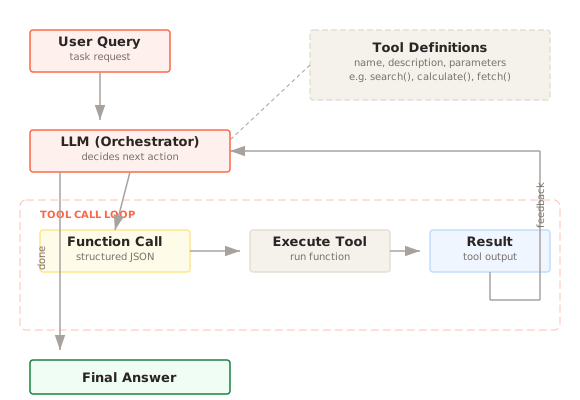
Tool Calling provides a complementary mechanism for structured interactions with external services. Code Execution handles open-ended computation while tool calling handles well-defined API operations. Many systems use both, letting the agent decide whether to call a predefined tool or write custom code depending on the task.
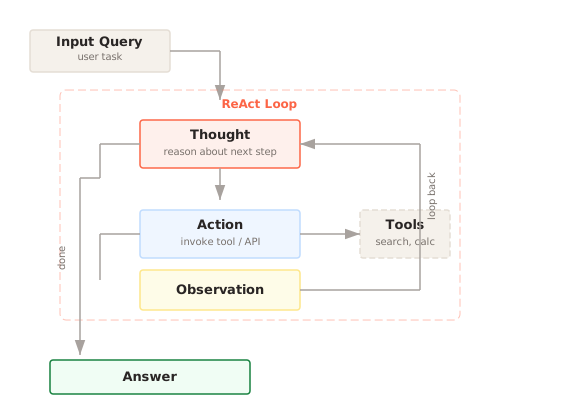
ReAct Loop creates a natural home for Code Execution as one of the available actions. The agent reasons about what it needs, generates and executes code, observes the output, and decides what to do next. This is particularly powerful for data analysis workflows where each step builds on the previous result.
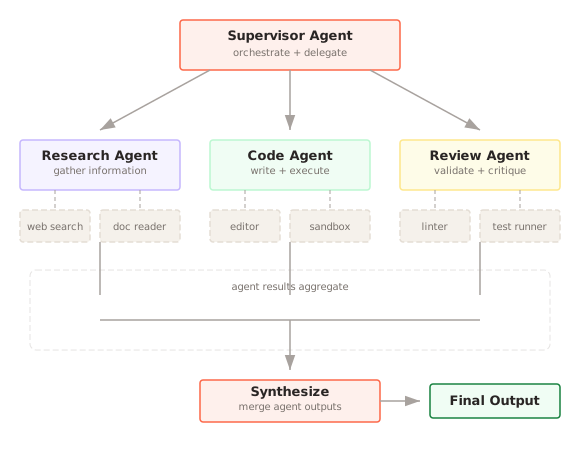
Multi-Agent Collaboration benefits from having a dedicated code execution agent that other agents can delegate to. A planning agent might break down a data analysis task, and a code execution agent handles the computational steps while other agents handle summarization or presentation.
References
- Chen, M., et al. (2021). Evaluating Large Language Models Trained on Code. arXiv preprint (Codex).
- Gao, L., et al. (2023). PAL: Program-Aided Language Models. ICML 2023.