How do they differ?
Both patterns give an LLM the ability to take action in the world beyond generating text. But they do it through fundamentally different trust models.
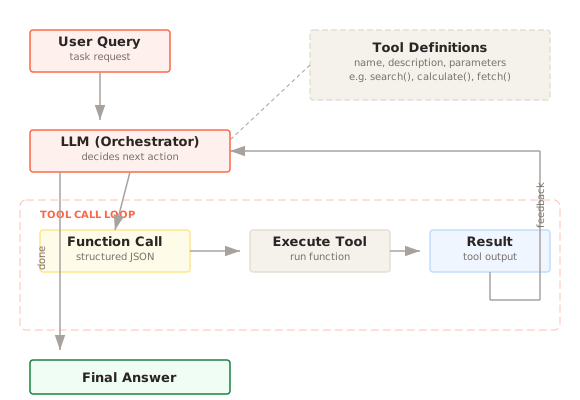
Tool Calling is a whitelist approach. You define a set of functions with typed parameters and descriptions. The model selects which function to call and fills in the arguments. Your application executes the function and returns the result. The model never touches the execution layer directly. It can only invoke capabilities you have explicitly exposed.
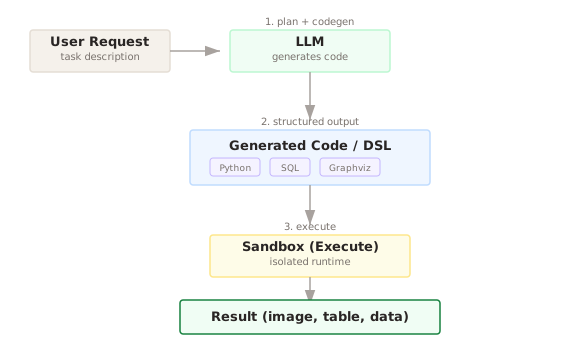
Code Execution is a sandbox approach. The model writes arbitrary code (usually Python), and your system executes it in a controlled environment. The model has creative freedom to solve problems computationally, but you must contain the blast radius through sandboxing, resource limits, and network restrictions.
| Dimension | Tool Calling | Code Execution |
|---|---|---|
| Model output | Structured function call (name + args) | Freeform source code |
| Execution control | Application code runs the function | Sandbox runs the model's code |
| Flexibility | Limited to defined tools | Arbitrary computation |
| Security model | Whitelist (only permitted operations) | Sandbox (contain arbitrary operations) |
| Failure mode | Wrong tool selection, bad arguments | Runtime errors, sandbox escapes, infinite loops |
| Determinism | High (same tool, same args = same result) | Variable (code may differ across runs) |
| Debugging | Easy (inspect tool name + args) | Harder (inspect generated code + output) |
| Setup effort | Define schemas, implement handlers | Build/configure sandbox, manage runtimes |
| Typical use | API calls, CRUD, integrations | Math, data analysis, visualization, file processing |
The mental model is this: Tool Calling is like giving someone a control panel with labeled buttons. Code Execution is like giving them a terminal. The control panel is safer and easier to monitor. The terminal is more powerful but harder to contain.
When to use Tool Calling
Tool Calling is the right choice when the operations the model needs to perform are known in advance, and each operation has a clear structure.
API integrations. Calling external services: sending emails, creating calendar events, querying databases, posting to Slack, filing tickets. These are structured operations with well-defined parameters. A tool schema maps naturally to an API endpoint. The model decides which API to call and with what parameters. Your code handles authentication, rate limiting, error handling, and response formatting.
CRUD operations on business data. Creating, reading, updating, and deleting records in your application. The model decides "create a new customer with these fields" and your application code validates the input, enforces business rules, and performs the database operation. The model never constructs SQL or interacts with the database directly.
Multi-step workflows with structured actions. Booking a flight involves searching for flights, selecting one, entering passenger details, and confirming payment. Each step is a tool. The model orchestrates the flow by calling tools in sequence, using the output of one tool to inform the next tool call. The workflow is predictable and auditable.
Retrieval and search. Searching a knowledge base, querying a vector database, looking up documentation. These are parameterized queries with structured results. Tool Calling handles them cleanly: the model constructs the query parameters, your code executes the search, and the results flow back to the model.
Actions with side effects that need authorization. Any operation that modifies state, costs money, or affects other systems should go through a tool with explicit authorization checks. Sending an email, transferring funds, deleting a file. You want these behind a controlled interface, not in freeform code where the model might construct unintended operations.
The pattern shines when you can enumerate the capabilities in advance. If you can write a complete list of "things the model should be able to do," tool calling is almost certainly the right approach.
When to use Code Execution
Code Execution is the right choice when the computation the model needs to perform is not known in advance, or when the problem requires algorithmic flexibility.
Mathematical computation. Arithmetic, statistics, linear algebra, optimization. LLMs are notoriously unreliable at arithmetic beyond simple calculations. Generating Python code that uses NumPy or SciPy and executing it gives exact results. "Calculate the compound interest on $50,000 at 4.2% over 30 years with monthly compounding" is trivial in code and error-prone in pure text generation.
Data analysis and transformation. Loading a CSV, filtering rows, computing aggregations, joining datasets, pivoting tables. These operations are inherently procedural and vary enormously depending on the data and the question. Predefining tools for every possible data transformation is impractical. Generating pandas code is natural and flexible.
Visualization and chart generation. Creating plots, charts, diagrams, and graphs. Matplotlib, Plotly, and similar libraries offer infinite customization through code. A tool-based approach would need to expose hundreds of parameters to match the same flexibility.
File processing and format conversion. Parsing XML, transforming JSON, extracting data from PDFs, resizing images, converting between formats. These are programmatic tasks where the specific processing logic depends on the file content and the user's request.
Algorithm implementation. When the user asks the model to implement and run a sorting algorithm, simulate a random walk, or test a hypothesis with a Monte Carlo simulation, the model needs to write and execute code. These are not operations you would predefine as tools.
Prototyping and exploration. In a coding assistant context, the user might ask "try this approach and show me the output." The model writes code, runs it, observes the result, and iterates. This exploratory loop is the core value proposition of code execution.
The pattern shines when you cannot enumerate the capabilities in advance. If the set of possible computations is open-ended, code execution is the way to go.
Can they work together?
Yes, and the combination is how most capable AI agents work in practice. The model uses tool calling for structured interactions with external systems and code execution for freeform computation. Each handles what it does best.
A concrete example: the user asks "Pull our Q3 sales data and create a chart showing monthly revenue by region, highlighting any months where we missed target."
- Tool call:
query_database(table="sales", quarter="Q3", fields=["month", "region", "revenue"])returns structured data. - Tool call:
get_targets(quarter="Q3")returns the revenue targets. - Code execution: The model writes Python that loads both datasets into pandas DataFrames, computes aggregations, identifies months below target, and generates a matplotlib chart with the appropriate highlighting.
The database queries go through tools because they involve authentication, access control, and connection management that you do not want in freeform code. The analysis and visualization go through code execution because the specific computations and chart formatting are unique to this request.
Another integration pattern is using code execution as a tool. You define a run_code tool with parameters for the code string and the language. The model calls this tool just like any other, but the execution happens in a sandbox. This gives you a unified tool calling interface while still supporting arbitrary computation. Many frameworks (LangChain, OpenAI Assistants) implement code execution this way.
A third pattern is code execution with tool access. The sandbox environment has access to certain libraries or helper functions that effectively act as tools. The model writes code that calls db.query("SELECT ...") or api.send_email(to, subject, body). The code has more flexibility than structured tool calls, but the available operations are still controlled through what you expose in the sandbox.
The security boundaries need careful thought in combined architectures. Tool calls are validated by your application code before execution. Code execution is contained by the sandbox. If you let code execution call tools directly (bypassing your validation layer), you lose the safety guarantees of tool calling. Keep the security models separate: tool calls go through your validation pipeline, code runs in the sandbox, and data flows between them through controlled interfaces.
Common mistakes
Using tool calling for computation. Building a calculate tool or an analyze_data tool with dozens of parameters to avoid code execution. The tool becomes unwieldy, the parameter space explodes, and the model struggles to construct the right call. If the task is computational, let the model write code. That is what code execution is for.
Using code execution for API calls. Letting the model write requests.post("https://api.example.com/...") in generated code instead of defining a proper tool. This means your API keys need to be in the sandbox environment, the model might construct malformed requests, error handling is ad hoc, and you have no centralized logging or rate limiting. API interactions should go through tools.
Underestimating sandbox security. "We will just run it in a Docker container" is a start, not a complete security model. You also need: resource limits (CPU, memory, time), network restrictions (block all outbound traffic or restrict to specific endpoints), filesystem isolation (no access to host filesystem), process limits (no fork bombs), and input sanitization (no shell injection through code string construction). Production sandboxes like E2B, Modal, and Fly.io handle most of this for you.
Not handling code execution failures. Generated code fails more often than tool calls. Syntax errors, runtime exceptions, import errors for unavailable libraries, infinite loops. Your system needs to catch these failures, present them to the model, and let it retry with corrected code. Most successful implementations allow two or three retry attempts with error feedback.
Ignoring output validation. Just because code executed successfully does not mean the output is correct. A chart might have swapped axes. A calculation might use the wrong formula. Consider adding a validation step where the model reviews the code output before presenting it to the user, especially for high-stakes computations.
Making the sandbox too restrictive. If the sandbox does not have the libraries the model needs (pandas, numpy, matplotlib, scipy), the model will fail on common tasks. Pre-install the libraries your use case requires. If you are too restrictive, the model will try to work around the restrictions, which often produces worse results than just providing the right tools.
Not logging generated code. Unlike tool calls (which have structured logs: tool name, parameters, result), code execution produces opaque logs unless you explicitly capture the generated code, its output, and any errors. For debugging, auditing, and monitoring, you need to log the full code string alongside the execution result.
References
- Schick, T., et al. "Toolformer: Language Models Can Teach Themselves to Use Tools." NeurIPS 2023.
- Qin, Y., et al. "Tool Learning with Foundation Models." 2024.
- OpenAI. "Function Calling." API Documentation. 2024.
- Anthropic. "Tool Use." API Documentation. 2024.
- Chen, B., et al. "ChatCoT: Tool-Augmented Chain-of-Thought Reasoning on Chat-based Large Language Models." 2023.
- E2B. "Open-Source Sandboxes for AI-Generated Code." 2024.