What are Agent Skills?
An Agent Skill is a folder containing a SKILL.md file — YAML frontmatter with at minimum a name and description, followed by instructions that teach an agent how to perform a specific task. A skill can also bundle scripts, reference documents, and templates. The agent discovers the skill by its metadata, loads the full instructions only when a task calls for them, and executes any bundled code as part of following them.
Skills package procedural knowledge: how your team reviews a contract, how a release gets cut, which chart conventions your reports use. That knowledge previously lived in system prompts (always in context, always paying rent) or in people's heads (not in context at all). Skills put it in version-controlled files that load exactly when relevant.
Current version status
Verified August 6, 2026. Anthropic introduced Agent Skills on October 16, 2025 and published the format as an open standard at agentskills.io on December 18, 2025. Adoption is broad: the standard's client showcase lists Claude Code, Claude, Cursor, GitHub Copilot, VS Code, Gemini CLI, OpenAI Codex, Goose, OpenHands, OpenCode, Amp, Letta, and dozens of other agents and frameworks. On the protocol side, the MCP community runs a Skills over MCP working group, defining how skills are discovered and consumed through MCP — a signal that the two standards are converging on complementary roles rather than competing.
What problem do Agent Skills solve?
General-purpose agents fail at specialized work not because the model is weak but because the context lacks the procedure. Before skills, teams patched this three ways, each with a cost:
- Everything in the system prompt: every instruction for every workflow rides along on every request, consuming context whether relevant or not, and diverging per tool.
- Per-app custom instructions: the same workflow rewritten for each agent product, drifting out of sync.
- Tribal knowledge: the procedure exists only in whoever ran it last.
A skill solves all three at once. The workflow is written once, versioned in git, loaded only when triggered, and — because the format is an open standard — portable across every compatible agent. A skill written for Claude Code works in Cursor, Copilot, or Gemini CLI without translation.
Anatomy of a skill
my-skill/
├── SKILL.md          Required: frontmatter + instructions
├── scripts/          Optional: executable code
├── references/       Optional: documentation loaded on demand
└── assets/           Optional: templates and resources
A minimal SKILL.md:
---
name: release-notes
description: Draft release notes from merged PRs. Use when the user asks
  to prepare, write, or publish release notes for a version.
---

# Release Notes

1. List PRs merged since the last tag: `scripts/merged-prs.sh <last-tag>`.
2. Group changes as Added / Changed / Fixed; exclude dependency bumps.
3. Follow the voice rules in `references/style.md`.
4. Output markdown matching `assets/template.md`.
The load model is progressive disclosure, and it is the core design principle:
- Discovery. At startup the agent loads only each skill's
nameanddescription— a few dozen tokens per skill, enough to know when it is relevant. - Activation. When a task matches the description, the agent reads the full
SKILL.mdbody into context. - Execution. Bundled references and scripts load or run only as the instructions call for them.
This is context engineering applied to procedural knowledge: an agent can keep hundreds of skills installed while spending almost no context on the ones that are dormant. The description field does the heavy lifting — it is the retrieval key that determines whether the skill fires at the right moment.
Skills and MCP
The cleanest division of labor: skills teach workflows, MCP provides tools. MCP standardizes how an agent reaches a capability — a database query, a ticketing API. A skill standardizes how the agent should use those capabilities to complete a job: the order of steps, the checks, the house style, the edge cases.
They compose naturally. A quarterly-report skill might instruct the agent to pull figures through an MCP server, validate them with a bundled script, and format the result from a bundled template. Neither standard replaces the other, and the Skills over MCP working group is formalizing how MCP servers can distribute skills themselves.
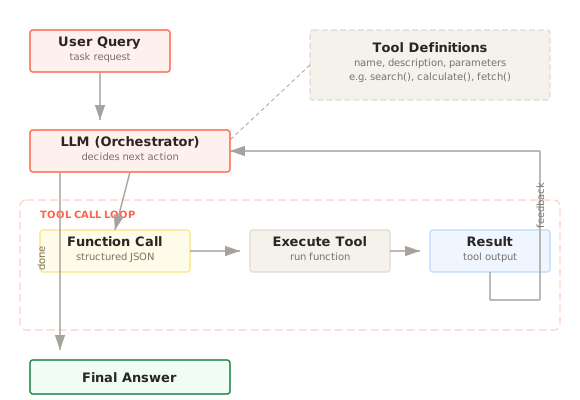
Prefer a skill over Tool Calling or MCP when the gap is knowledge, not access — the agent can already reach everything it needs and still does the job wrong. Prefer a tool when the gap is access. If the agent lacks both, you will end up with one of each, and that is the normal case, not a smell.
When should you use Agent Skills?
Use skills when:
- a workflow is repeated, multi-step, and currently lives in a system prompt, a wiki, or someone's memory;
- the same procedure must behave consistently across multiple agents or products;
- domain conventions (formats, review steps, style rules) matter as much as raw capability;
- part of the procedure is deterministic and belongs in a bundled script rather than model reasoning;
- you want workflow changes reviewed like code — diffed, versioned, and rolled back.
Skills are a weak fit when:
- the instruction is short and universal — put it in the system prompt;
- the task needs new access to systems or data — that is a tool or MCP server;
- the behavior must be enforced rather than suggested — instructions guide the model; Guardrails constrain it.
Implementation workflow
- Find the capability gap: run the agent on representative tasks and note where it improvises or gets your conventions wrong.
- Write the smallest
SKILL.mdthat closes the gap. Make thedescriptionstate both what the skill does and when to use it — it is the trigger. - Move deterministic steps into bundled scripts; keep model judgment for the parts that need it.
- Split long material into
references/files the instructions point to, so activation stays cheap. - Test the trigger in both directions: does the skill fire on matching tasks, and stay dormant on unrelated ones?
- Version the folder in git and treat edits like code review.
This site practices the pattern: every pattern in the catalog is published as an installable skill at /skills, generated from the same source content as the page you are reading.
Security considerations
A skill is instructions plus, often, executable code — installing one is closer to installing a package than writing a prompt. Treat it accordingly:
- Install skills only from trusted sources; audit unfamiliar ones before first use.
- Read bundled scripts and their dependencies, not just the markdown.
- Watch for instructions that direct the agent to untrusted external endpoints.
- Run skill-executed code under the same sandbox and permission model as any other agent-run code, and log what it does.
Failure modes
Vague descriptions: a skill whose description is generic ("helps with reports") either never fires or fires constantly. Write descriptions like retrieval queries: concrete task, concrete trigger phrases.
The everything-skill: one skill that tries to cover a whole domain reproduces the bloated-system-prompt problem one level down. Split by task; skills are cheap.
Stale procedures: a versioned skill that no one updates becomes confidently wrong — the agent follows last year's release process exactly. Assign ownership and review skills when the underlying process changes.
Instructions where enforcement is needed: a skill can tell an agent to never skip a validation step; it cannot guarantee it. Enforce invariants in bundled scripts or downstream systems, not prose.
Trigger collisions: overlapping descriptions make skill selection nondeterministic. Keep descriptions disjoint and test with tasks that sit near the boundary.
Frequently asked questions
What is the difference between a skill and a system prompt?
Placement and timing. A system prompt is always in context, for every request. A skill's instructions load only when a matching task appears. Universal, short rules belong in the system prompt; task-specific procedures belong in skills.
What is the difference between Agent Skills and MCP?
MCP gives an agent access to tools and data through a protocol. Skills give it the procedure for using them. MCP is a wire protocol between processes; a skill is a folder of files the agent reads. They are designed to compose.
Do skills work across different agent products?
Yes — that is the point of the open standard. The format (a folder with SKILL.md, name and description frontmatter, progressive disclosure) is implemented by Claude Code, Cursor, GitHub Copilot, VS Code, Gemini CLI, OpenAI Codex, and many others. Product-specific extensions exist, but the core format is portable.
Can a skill call tools?
A skill can instruct the agent to use any tool the host has granted it, including MCP servers, and can bundle scripts the agent executes. The skill grants no new permissions by itself — the host's permission model still applies.
Primary references
- Agent Skills open standard
- Agent Skills specification
- Equipping agents for the real world with Agent Skills — Anthropic Engineering
- Skills over MCP working group