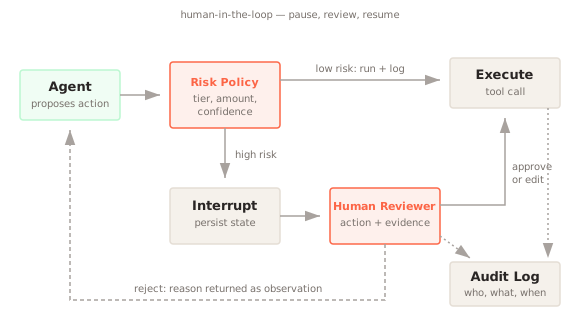
Human-in-the-Loop is a pattern that inserts a person at specific decision points in an AI workflow. The system runs on its own until it reaches a step that is risky, irreversible, or uncertain. It then pauses, shows a reviewer exactly what it intends to do, and waits. The reviewer approves, edits, or rejects the action, and the system resumes from where it stopped.
At a Glance
- Problem: Agents take actions such as refunds, emails, and deletions, and the model choosing them is sometimes wrong. Many costly actions look valid to a rule, so whether they are right depends on context only an authorized person has.
- Forces: Autonomy and speed versus control over irreversible actions; reviewing enough cases to cap risk versus a queue so long that reviewers approve without reading; reviewer time, the most expensive resource, versus the cost of an unreviewed mistake.
- Solution: A risk policy flags steps that need approval. The system interrupts, persists the proposed action and its state, and shows a reviewer the action and its evidence. The reviewer approves, edits, or rejects, and the run resumes.
- Consequences: Gains: the worst case is capped by what a reviewer would approve, so agents can ship before they are fully trusted, and edits show where the model goes wrong. Costs: minutes-to-hours latency, reviewer time and the risk that approval fatigue turns review into rubber-stamping.
What problem does Human-in-the-Loop solve?
Agents act. A Tool Calling agent can send an email, issue a refund, merge a pull request, or delete a record. The model choosing those actions will sometimes be wrong. It might misread the request, follow an instruction injected into a retrieved document, or pick the right tool with the wrong arguments. For a chat answer, a mistake costs a bad reply. For an action, it can cost money, data, or a customer.
Guardrails catch the mistakes you can describe in advance with rules or classifiers. Many costly mistakes don't look wrong to a rule. A refund of $4,800 is a valid refund. An email to the whole customer list is a valid email. Whether it is the right action depends on context that only a person with authority has.
OWASP lists this failure as "Excessive Agency" in its Top 10 for LLM applications: an LLM system given more ability to act than its reliability justifies. Its mitigations start with giving the system fewer tools and narrower permissions. For the high-impact actions that remain, it recommends requiring human approval.
How does Human-in-the-Loop work?
The pattern has four parts.
A risk policy decides which steps need a person. Most teams tier their tools. Read-only actions such as search or lookup run freely. Reversible, low-value writes run and get logged. Irreversible or high-value actions, such as payments, external messages, deletions, and deployments, require approval. The policy can also trigger on model signals: low confidence, a failed Self-Check, or a judge score below a threshold.
An interrupt stops the run at that step. The system records the proposed action with its arguments, the reasoning that led to it, and the full state needed to continue. It then exits instead of blocking a thread while it waits. Approvals can take minutes or days, so the pending state has to survive process restarts.
A review surface shows the reviewer what they are approving: the concrete action ("refund $4,800 to order 1182"), the evidence behind it, and what will happen on approval. It offers three choices: approve as-is, edit the arguments and approve, or reject with a reason.
A resume step feeds the decision back into the run. An approval executes the action. An edit executes the corrected action. A rejection goes back to the agent as an observation, so the agent can choose a different path or tell the user it couldn't proceed.
Every decision is logged with who made it and when. Keep the reviewers' edits as well: they show where the model's proposals go wrong, which tells you what to fix next.
When should you use Human-in-the-Loop?
Use it when the cost of a wrong action is high and hard to undo:
- The system moves money, sends messages to people outside your team, changes production systems, or deletes data
- Regulation requires human oversight. The EU AI Act requires high-risk systems, such as those used in hiring and credit decisions, to be designed so people can oversee them effectively
- You are launching a new agent and don't yet have data on how often it is wrong
- The model's confidence or an automated check says this particular case is unusual
When not to use it: for read-only or easily reversible actions, for high-volume decisions where no team could review every case, or as a substitute for fixing an agent that is wrong most of the time. If reviewers reject a large share of proposals, the agent needs work, and adding reviewers only hides the problem.
Implementation
# Using OpenAI SDK for illustration — swap client for any provider
import json
import uuid
from datetime import datetime, timezone
from openai import OpenAI

client = OpenAI()

TOOLS = [{"type": "function", "function": {
    "name": "issue_refund",
    "description": "Refund an order",
    "parameters": {"type": "object", "properties": {
        "order_id": {"type": "string"}, "amount": {"type": "number"}},
        "required": ["order_id", "amount"]}}}]

APPROVAL_THRESHOLD = 100.0     # refunds above this need a person
PENDING: dict[str, dict] = {}  # use a database in production
AUDIT: list[dict] = []

def issue_refund(order_id: str, amount: float) -> str:
    # In production, check order_id and amount against the order record first
    return f"Refunded ${amount:.2f} on order {order_id}"

def run(request: str) -> str:
    msg = client.chat.completions.create(
        model="gpt-4o", messages=[{"role": "user", "content": request}],
        tools=TOOLS, parallel_tool_calls=False,
    ).choices[0].message
    if not msg.tool_calls:
        return msg.content or ""
    args = json.loads(msg.tool_calls[0].function.arguments)
    if not isinstance(args, dict):
        args = {}
    amount = args.get("amount")   # non-numbers, bools, NaN, zero, negative go to review
    is_number = isinstance(amount, (int, float)) and not isinstance(amount, bool)
    if is_number and 0 < amount <= APPROVAL_THRESHOLD and args.get("order_id"):
        return issue_refund(args["order_id"], amount)
    ticket = str(uuid.uuid4())
    PENDING[ticket] = {"request": request, "args": args}   # interrupt
    return f"Waiting for approval: {ticket}"

def resume(ticket: str, reviewer: str, decision: str,
           edited_args: dict | None = None, reason: str = "") -> str:
    pending = PENDING.pop(ticket, None)
    if pending is None:
        raise ValueError(f"Unknown or already-resolved ticket: {ticket}")
    AUDIT.append({"ticket": ticket, "reviewer": reviewer, "decision": decision,
                  "at": datetime.now(timezone.utc).isoformat()})
    if decision == "approve":
        return issue_refund(**pending["args"])
    if decision == "edit" and edited_args is not None:
        return issue_refund(**edited_args)
    return f"Refund rejected: {reason or 'no reason given'}"  # fail closed

# Usage
print(run("Order 1182 arrived broken, refund the full $480."))
# Later, from the review UI: resume(ticket, "maria", "approve")
The key move is that run returns instead of waiting. The pending action lives in storage, and resume can be called by a different process, hours later, after a person clicks a button. Two details matter as much as the gate itself. The amount check sends anything malformed, zero, or negative to review rather than letting it through. And resume fails closed: any decision other than an explicit approve or a valid edit is treated as a rejection.
In a full agent loop, pass the rejection message back to the model as the tool result so it can choose another path. LangGraph provides this as interrupt(), which pauses a graph and is resumed with Command(resume=...); it requires a checkpointer so the graph state survives while it waits.
Worked Example: Cost and Latency
A refund agent proposes 2,000 actions a day; each proposal is one large-model call with 3,000 input tokens and 200 output tokens, and a review takes 2 minutes of reviewer time at an assumed $60 per reviewer-hour.
| Setup | Share reviewed | Reviewer minutes per 1,000 actions | Cost per 1,000 actions (model + review) | Latency per action |
|---|---|---|---|---|
| No review | 0% | 0 | $12.00 | 3.8 s |
| Review high-risk actions only | 5% | 100 | $112.00 | 3.8 s, plus queue wait for the 5% reviewed |
| Review every action | 100% | 2,000 | $2,012.00 | 3.8 s, plus queue wait for every action |
The model call costs 3,000 × $3.00 per million + 200 × $15.00 per million = $0.012, or $12.00 per 1,000, and takes 0.5 s + 200 / 60 s ≈ 3.8 s. A 2-minute review at $60 per hour costs $2.00, so reviewing 50 of every 1,000 actions adds $100. At 2,000 actions a day, the 5% policy needs about 3.3 reviewer-hours daily; reviewing everything needs about 67 hours, more than eight full-time reviewers. Reviewed actions wait minutes to hours for a person, which dwarfs the model's 3.8 s.
Reviewer time is about 89% of spend even at a 5% review share, so the pattern pays off when the reviewed share stays small and each reviewed action risks more than the $2.00 a review costs; reviewing everything is rarely affordable beyond a pilot.
What are the common pitfalls?
Approval fatigue. If reviewers see dozens of routine requests an hour, they stop reading and click approve. A review step that is always approved provides no protection while adding latency. Keep the approval queue small by tiering tools carefully and raising thresholds as you gain confidence.
Reviewing the wrong thing. Showing a reviewer the model's chain of reasoning instead of the concrete action invites rubber-stamping of plausible-sounding text. Show the action, its arguments, and the evidence, in that order.
Blocking on the reviewer. Holding an HTTP request or a worker thread open while waiting for a person breaks as soon as the reviewer takes a coffee break. Persist the pending state and resume asynchronously.
No timeout policy. Decide what happens when nobody responds: escalate to a second reviewer, cancel and notify the user, or (for low-risk cases only) proceed. Without a timeout, a pending action can wait indefinitely while the user hears nothing.
Approving the action but not its inputs. If a prompt injection planted in a retrieved document shaped the action, the reviewer needs to see that document. Include the sources behind the proposal.
What are the trade-offs?
Human review adds latency measured in minutes to hours, not milliseconds. For workflows where the user is waiting, this changes the product: the system must say "submitted for review" and notify the user later.
It costs reviewer time, which is usually the most expensive resource in the system. The pattern only scales when the share of cases that need review is small, which means it works best combined with automated checks that handle the clear cases.
Reviewers make mistakes too, and they become a single point of failure for anything they approve. Track their decisions, sample approved actions for audit, and measure how often approved actions later turn out to be wrong.
In return, the worst case is capped by what a reviewer would approve rather than by what the model might do. That often makes it possible to deploy an agent earlier, before you have enough data to trust it unsupervised.
Goes Well With
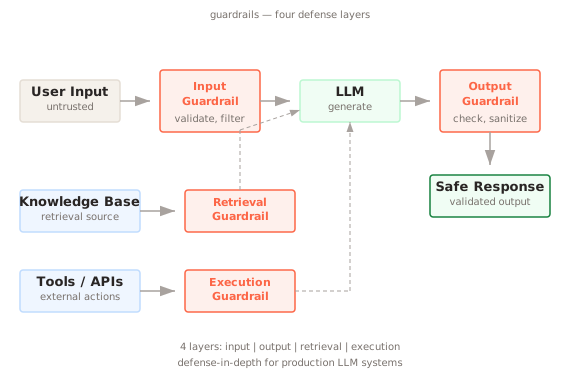
Guardrails handle the cases you can rule out automatically, so humans only see the ambiguous ones. Put guardrails first and human review behind them.
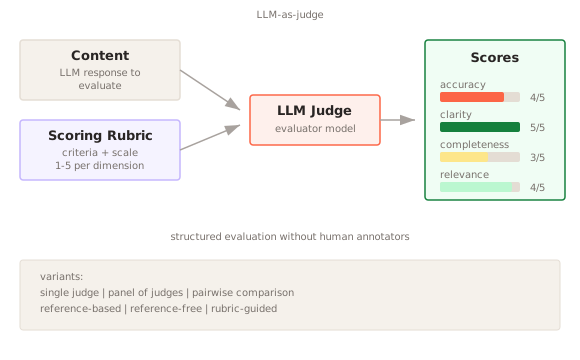
LLM-as-Judge can score each proposed action and route only the low-scoring ones to a person, which keeps the queue short.
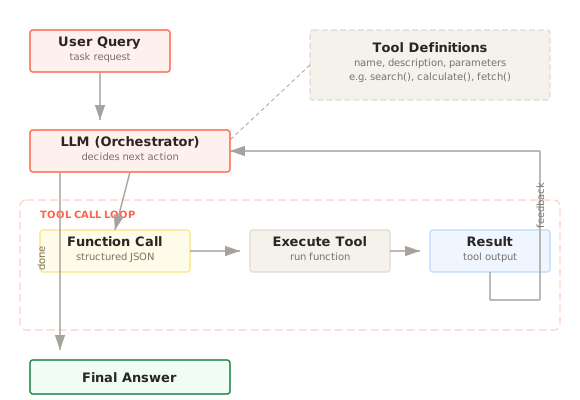
Tool Calling is where approval gates usually live. Tag each tool with a risk tier and enforce the gate in your tool executor, not in the prompt.
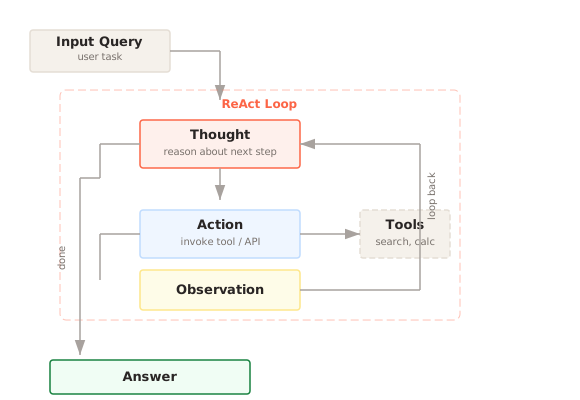
ReAct Loop agents need a clean way to receive a rejection. Return the reviewer's decision as the tool observation so the agent can adapt instead of retrying the same action.
References
- OWASP. (2025). OWASP Top 10 for LLM Applications, LLM06: Excessive Agency.
- European Union. (2024). Artificial Intelligence Act, Article 14: Human Oversight (applies to high-risk AI systems).
- Anthropic. (2024). Building Effective Agents. Agents pausing for human feedback at checkpoints.
- LangChain. LangGraph documentation: Human-in-the-loop.
interrupt(),Command(resume=...), and checkpointers.
Further Reading
- Amershi et al., "Guidelines for Human-AI Interaction" (2019) — Eighteen design guidelines from Microsoft Research for AI systems that work with people, including how to support efficient correction and dismissal of AI actions. CHI 2019.